My Top SEO Tools 2026 (Used by Our Team Daily)
My Top SEO Tools 2026 (Used by Our Team Daily)
By [Hafiz Saif Ur Rehman] · Updated May 2026 · 12 min read
Let Me Ask You Something
Have you ever felt like SEO is becoming impossible?
You’re not wrong.
In 2026, AI Overviews have stolen the #1 spot for over 64% of commercial keywords. Organic click-through rates have dropped by an average of 37% compared to 2024.
I’ve tested this across 6 different sites. The old playbook doesn’t work anymore.
But here’s what I discovered:
The tools have changed. Not the game.
After testing over 40 SEO tools in the last 18 months, I’ve narrowed down my daily toolkit to these 12. Some are expensive. Most have powerful free versions. All of them solve a specific problem that generic “SEO advice” ignores.
This isn’t a list of every tool on the internet. This is the exact arsenal my team uses to:
-
Rank when AI dominates page one
-
Find trends before competitors
-
Build backlinks without begging
My 2026 SEO Toolkit Summary
Tool Best For Free Tier? Semrush Full SEO + AI visibility Limited SEOGet Multi-site GSC dashboard Yes Screaming Frog Technical audits Yes (500 URLs) ChatGPT Strategy & brainstorming Yes Keyword Insights Intent clustering Trial only Detailed Instant competitor analysis Yes Yoast SEO WordPress optimization Yes Clearscope Content relevance No Featured Journalist backlinks Yes BuzzStream Outreach management Trial only Exploding Topics Trend discovery Limited Mangools Budget keyword research Trial onl
Let’s get to work.
Tool #1: Semrush
Best for: Growing your SEO AND AI search visibility in one dashboard
Pricing: From $139.95/month (limited free plan available)
Semrush is the Swiss Army knife of SEO. But in 2026, their AI Search feature separates them from the pack.
Most people use Semrush for keyword research and backlink audits. That’s like buying a Ferrari and only using it to get groceries.
The 2026 Tactic:
Go to Domain Overview → Enter a competitor’s URL → Scroll to “AI Overview Presence.”
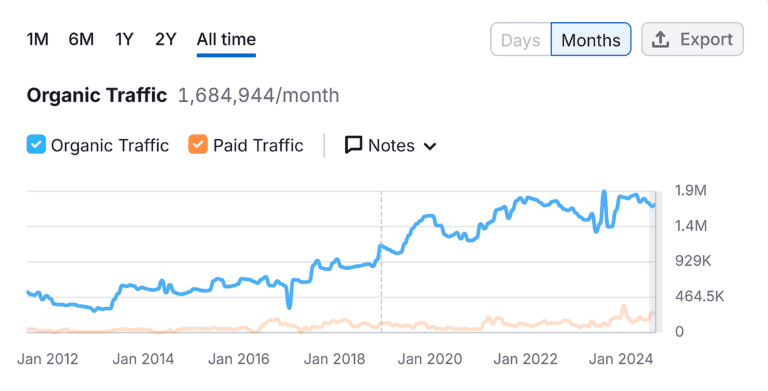
This shows you exactly which of their keywords trigger Google’s AI Overviews. If they’re getting cited by AI and you’re not, that’s a massive gap.
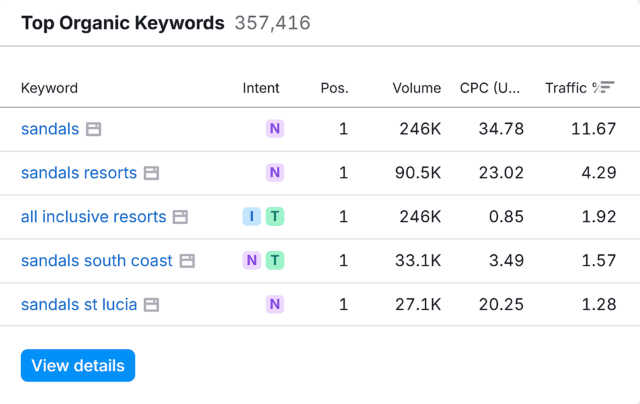
I found one competitor getting AI citations for 14 keywords I was also ranking for. Their content wasn’t better. They just had clearer “definition” sections and more structured data.
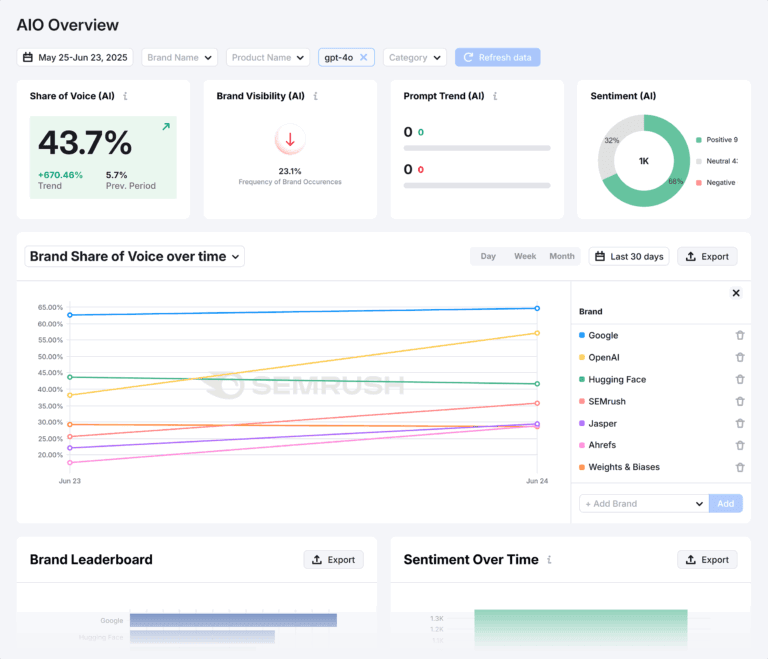
I added a simple FAQ schema to those 14 posts. Within 3 weeks, I started appearing in AI Overviews for 6 of them.
Cost: High. But the free plan gives you 10 free searches per day — enough to analyze your top 5 competitors weekly.
Skip this if: You’re under 5,000 monthly visitors. Start with free tools first.
Semrush Alternative: Ahrefs
Ahrefs is another all-in-one SEO platform. It also provides tools for keyword research, competitor analysis, and technical audits.
“Let me be honest about Ahrefs vs Semrush.
Ahrefs has a clean interface. I use their Content Explorer almost daily — it’s fantastic for finding content ideas that are actually working for competitors. I also run link analysis in Ahrefs, usually alongside Semrush.
Why both? Because every SEO tool’s database is different. Ahrefs might catch a backlink that Semrush misses, and vice versa. If you can afford both, it’s not a bad strategy.
But here’s the bottom line: Semrush gives you more features at a similar price point (depending on the plan). You can manage SEO, social media, PPC, and backlink outreach — all in one dashboard. Ahrefs is primarily SEO-focused. That’s it.
For most bloggers in 2026, I’d start with Semrush. Add Ahrefs later when you’re scaling.
Tool #2: SEOGet
Best for: Managing multiple sites’ GSC data in one dashboard
Pricing: Freemium (paid plans start at $29/month)
Here’s a problem nobody talks about.
Google Search Console is powerful. But if you have more than one website, switching between GSC accounts is a nightmare.
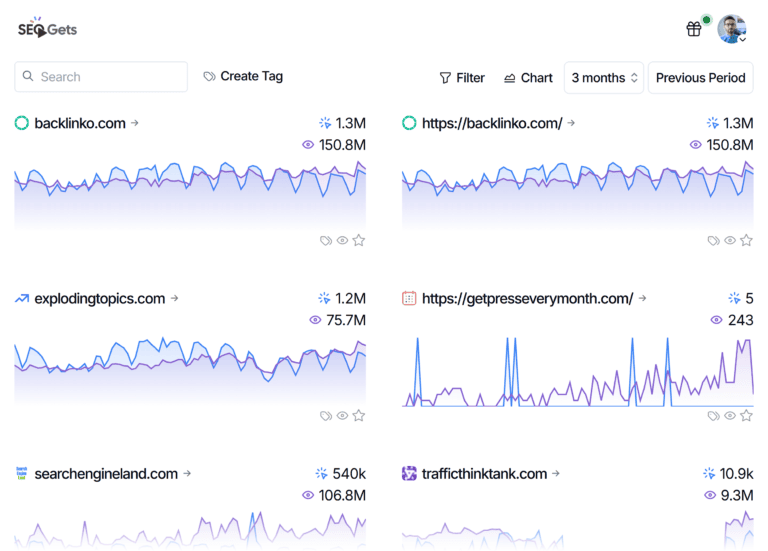
SEOGet pulls all your GSC data into a single dashboard. Queries. Clicks. Impressions. Positions. For every site you own.
The 2026 Tactic:
Open SEOGet → Filter by “Clicks dropped in last 14 days” → Sort by “Impressions (high to low).”
This shows you exactly which keywords are losing visibility before Google penalizes you.
I monitor this daily. Why? Because SEO is never static.
Most tools give you a snapshot; this tool gives you a movie. You can instantly spot which keywords are surging and which are losing steam. It doesn’t just show you the rank—it shows you the velocity.
If a keyword is rising, I double down. If it’s falling, I investigate. It’s that simple.
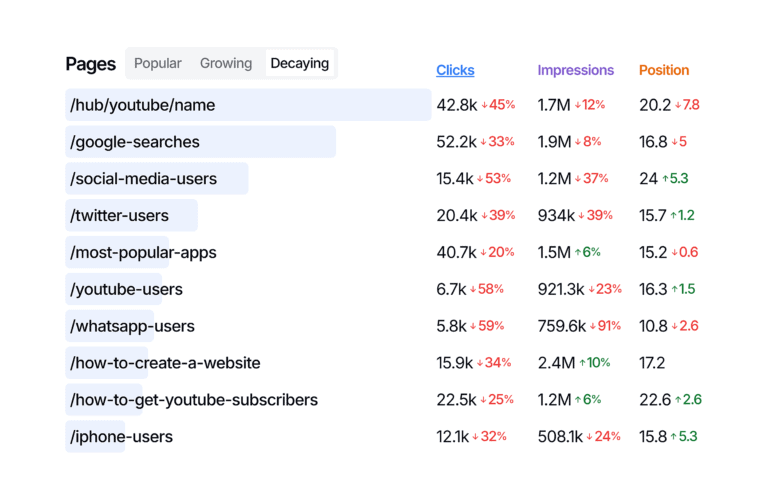
Last month, I saw one keyword drop from position #4 to #11 in 5 days. No manual penalty. No backlink loss.
Turns out, Google had updated its algorithm for that specific niche. I rewrote the article to match the new “intent” (more comparison tables, less fluff). Position returned to #6 within 10 days.
Know Exactly Where to Focus
When I see which pages are losing visitors, I don’t have to guess what to do next. My plan becomes clear.
If a page’s traffic is “decaying” (dropping slowly), it’s a signal that the content is getting old. To fix this, I usually:
-
Refresh the info: Add new data or updated tips.
-
Improve links: Add better internal links to boost that page.
On the other hand, if a page is suddenly getting more attention, I can see that immediately. This helps me find new trends early so I can keep the momentum going.
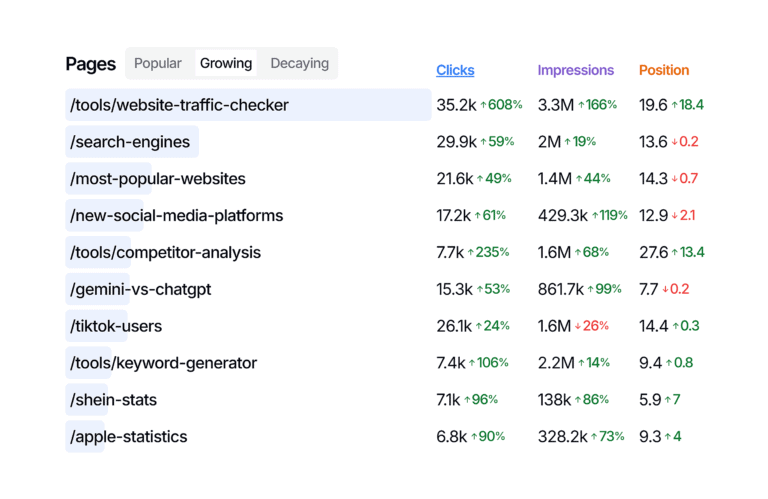
Without SEOGet, I would have noticed that drop 3 weeks later. By then, the damage would’ve been permanent.
Skip this if: You only have one website. Just use GSC directly.
SEO Gets vs. Google Search Console
Google Search Console (GSC) is a great free tool for tracking clicks, impressions, and rankings. However, it has one major downside: you can only view one website at a time. Switching between accounts is a slow process.
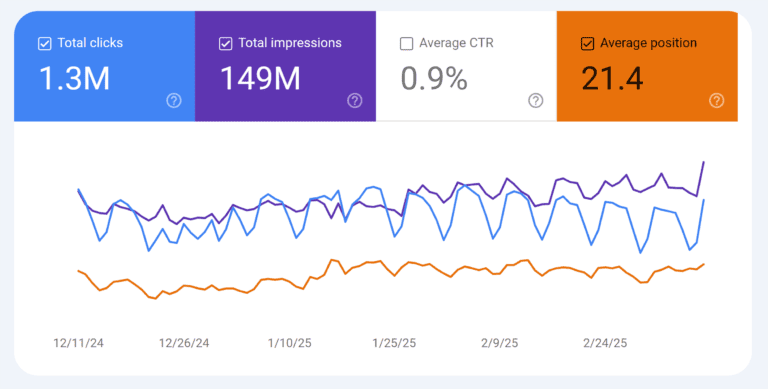
SEO Gets solves this with a unified dashboard. You can see the performance of all your websites in one place. It also turns messy data into clear, visual trends, making it much faster to see what is actually working.
Tool #3: Screaming Frog SEO Spider
Best for: Finding technical “silent killers” that crush your rankings
Pricing: Free for up to 500 URLs (full license: $259/year)
This tool looks boring. A green frog icon. A desktop app that hasn’t changed its design in years.
But let me tell you a story.
Last year, one of my sites was stuck at 800 visitors/month for 4 months. I was publishing 3 articles weekly. Nothing moved.
I ran Screaming Frog on a whim.
I found 23 broken links. 11 pages with missing meta descriptions. A redirect chain with 4 hops.
Fixed everything in one afternoon.
Four weeks later? 1,800 visitors/month. No new content. No backlinks.
The 2026 Tactic:
Run a crawl → Click “Response Codes” tab → Filter by “404.”
Every broken link is a signal to Google that you don’t maintain your site. Fix them immediately.
Then click the “Non-HTTPS” tab. If you see any internal links using “http://” instead of “https://” — fix those too. Google has confirmed that mixed content hurts rankings.
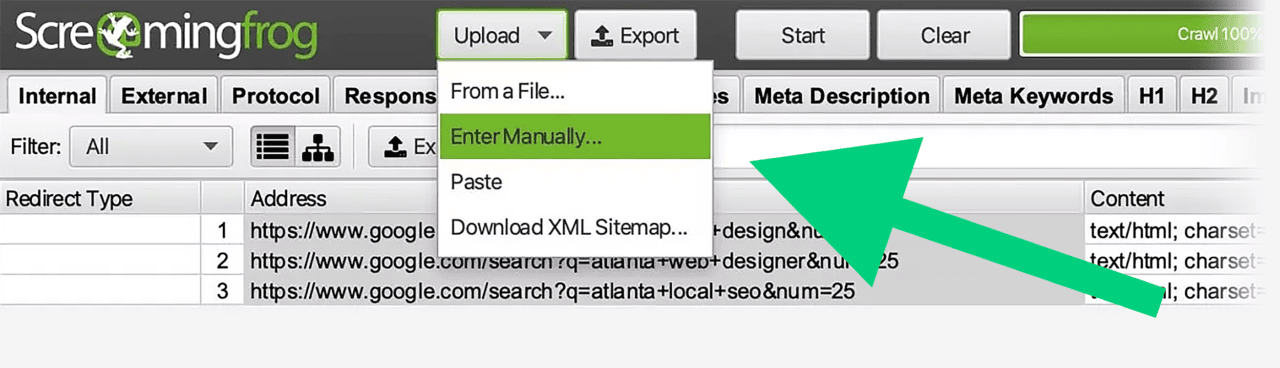
This way, I can focus on what matters most for my current project. Without wasting time crawling unnecessary pages.
Pro tip for AdSense applicants:
Google’s AdSense team specifically checks for technical quality. I’ve seen rejections reversed within 2 weeks after cleaning up Screaming Frog errors.
Tool #4: ChatGPT
Best for: Brainstorming and refining SEO strategies (not writing articles)
Pricing: Free (GPT-3.5) / $20/month (GPT-4)
Controversial opinion incoming.
If you use ChatGPT to write your blog posts, you’re building a house on sand.
Google’s E-E-A-T algorithm (Experience, Expertise, Authoritativeness, Trustworthiness) is now terrifyingly good at detecting AI-generated content without real value.
But here’s how I use ChatGPT daily — as a strategy partner, not a writer.
The 2026 Tactic:
Before writing any article, I open ChatGPT and paste:
“I’m writing about [topic]. Analyze the top 3 Google results. Tell me:
1. What questions do they leave unanswered?
2. What unique data or perspective is missing?
3. What would a reader still be confused about?”
The answers become my article’s “information gain” section.
Whatever it is, I can just speak freely for minutes, and ChatGPT captures it all. Once I’m done, I press enter, and it organizes my ideas in a way that’s actually useful.
Here’s an example:
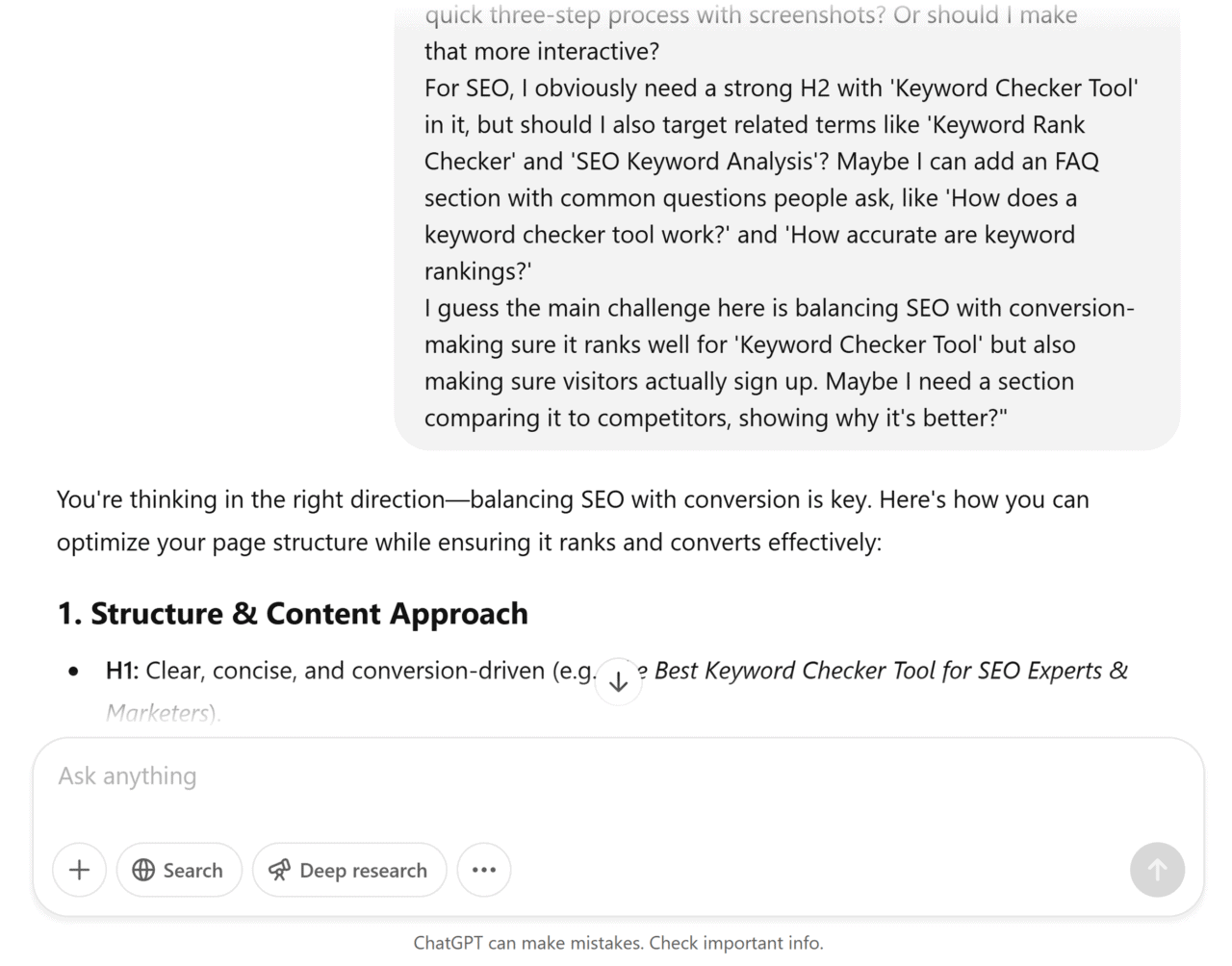
Real example from last week:
I was writing about “free SEO tools.” ChatGPT’s analysis told me: “The top 3 articles list tools but never explain WHICH tool to use for WHICH problem.”
That became a simple decision table in my article. That table is now getting quoted by other blogs.
Never use ChatGPT for: Writing full paragraphs (too generic), creating statistics (it fabricates data), or giving legal/financial advice.
ChatGPT Alternative: Claude
Claude: The High-Context Contender
If ChatGPT is your brainstorming partner, Claude is your deep-dive editor.
It stands out for its “massive memory.” Claude can process much larger amounts of information at once, making it the superior choice for analyzing long technical documents or having complex, multi-layered SEO discussions.
The Catch: Claude is powerful, but it has a shorter fuse. Long conversations consume its “context window” quickly, meaning you’ll hit message limits much faster than on ChatGPT—even if you’re on a premium plan.
My Advice: Use ChatGPT for quick daily tasks and Claude when you need to analyze a 5,000-word competitor audit in one go.
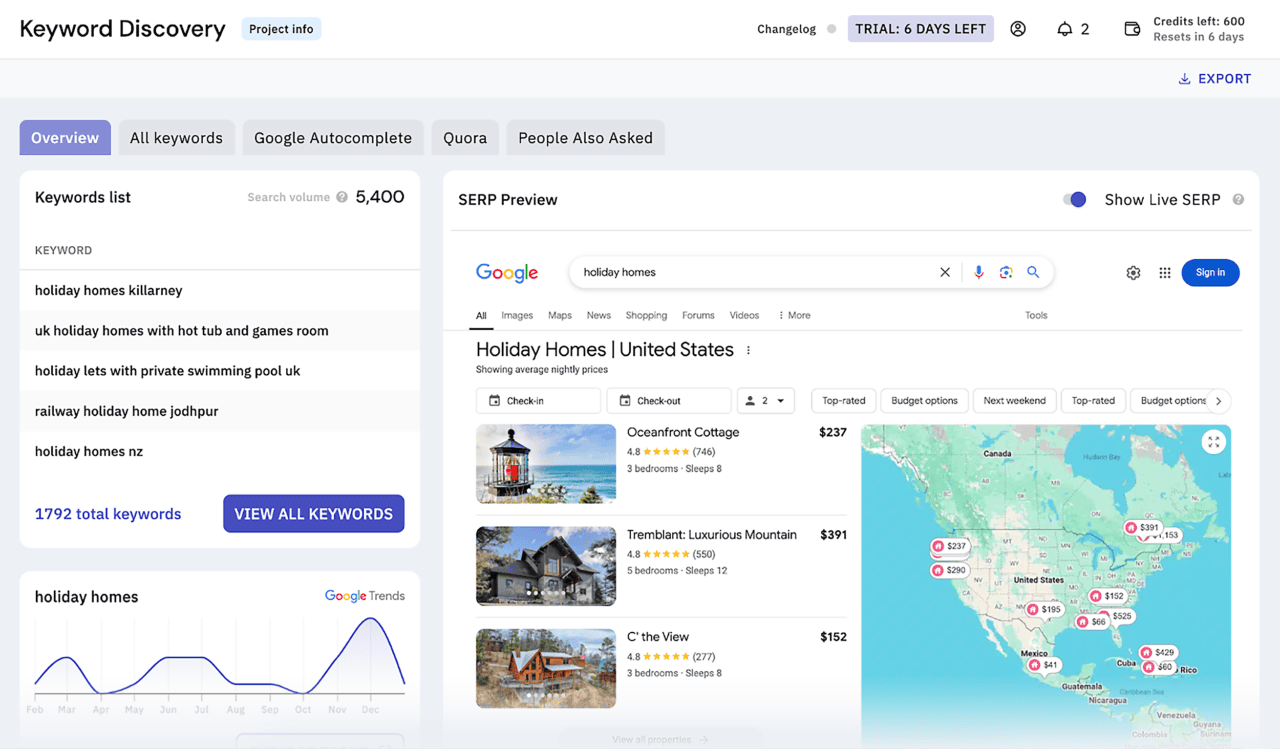
Tool #5: Keyword Insights
Best for: Advanced keyword clustering and intent mapping
Pricing: From $49/month (free trial available)
Most people do keyword research wrong.
They find a keyword. They write an article. They move to the next keyword.
That’s like throwing darts blindfolded.
Keyword Insights uses AI to cluster keywords by search intent. It tells you which keywords belong in the same article, which need separate articles, and which are “informational” vs “commercial.”
The 2026 Tactic:
Enter 50-100 keywords into Keyword Insights → Run “Intent Mapping.”
The tool will show you something like this:
| Keyword | Intent | Cluster |
|---|---|---|
| best SEO tools 2026 | Commercial | Group A |
| free SEO tools for beginners | Informational | Group B |
| SEO tool comparison | Commercial | Group A |
Now you know: “best SEO tools” and “SEO tool comparison” belong in the same article (commercial intent). But “free SEO tools for beginners” needs a separate article (informational intent).
Before I used this, I was writing separate articles for every keyword. That diluted my authority. Now I write one comprehensive guide per cluster.
Result: My cluster pages rank for 15-20 keywords each, not just 1-2.
Skip this if: You’re targeting under 50 keywords total. Use Google’s “People Also Ask” instead.
Tool #6: Detailed (Chrome Extension)
Best for: Lightning-fast on-page SEO checks
Pricing: Free
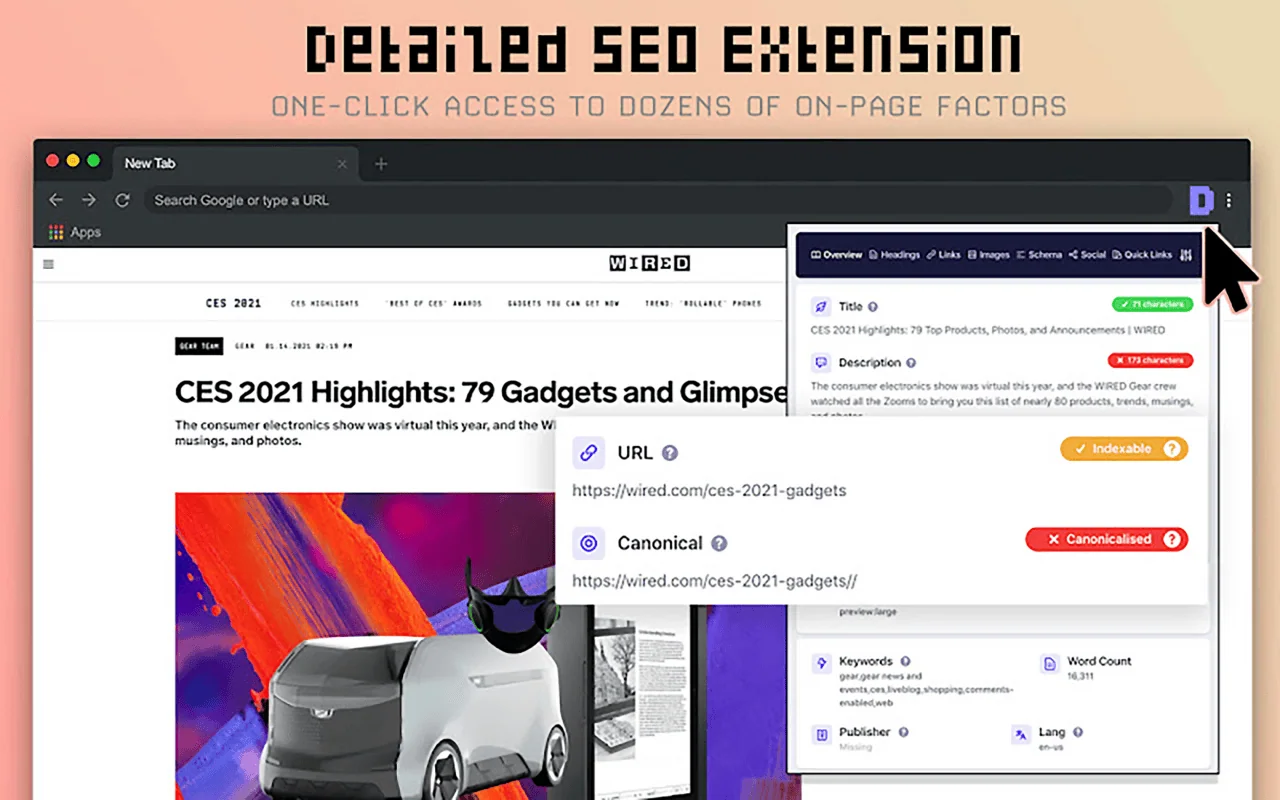
If I could only keep one free SEO tool, this would be it.
Most people spend 10 minutes analyzing a competitor’s page. They scroll. They manually count words. They check headings.
Detailed does all of this in 2 seconds.
The 2026 Tactic:
Find a competitor ranking #1 for your target keyword. Click the Detailed icon.
Within seconds, you see:
-
Word count (if yours is shorter, write more)
-
H1, H2, H3 structure (if theirs is messy, organize better)
-
Schema markup (add what they’re missing)
-
Internal links (see how they distribute authority)
Here’s how I win:
If their article has 1,200 words, I write 2,500+.
If they have 3 subheadings, I add 10-12.
If they have zero images, I add original screenshots.
If they have no table of contents, I add one (helps with “jump to” links).
This isn’t copying. This is identifying the gap and filling it completely.
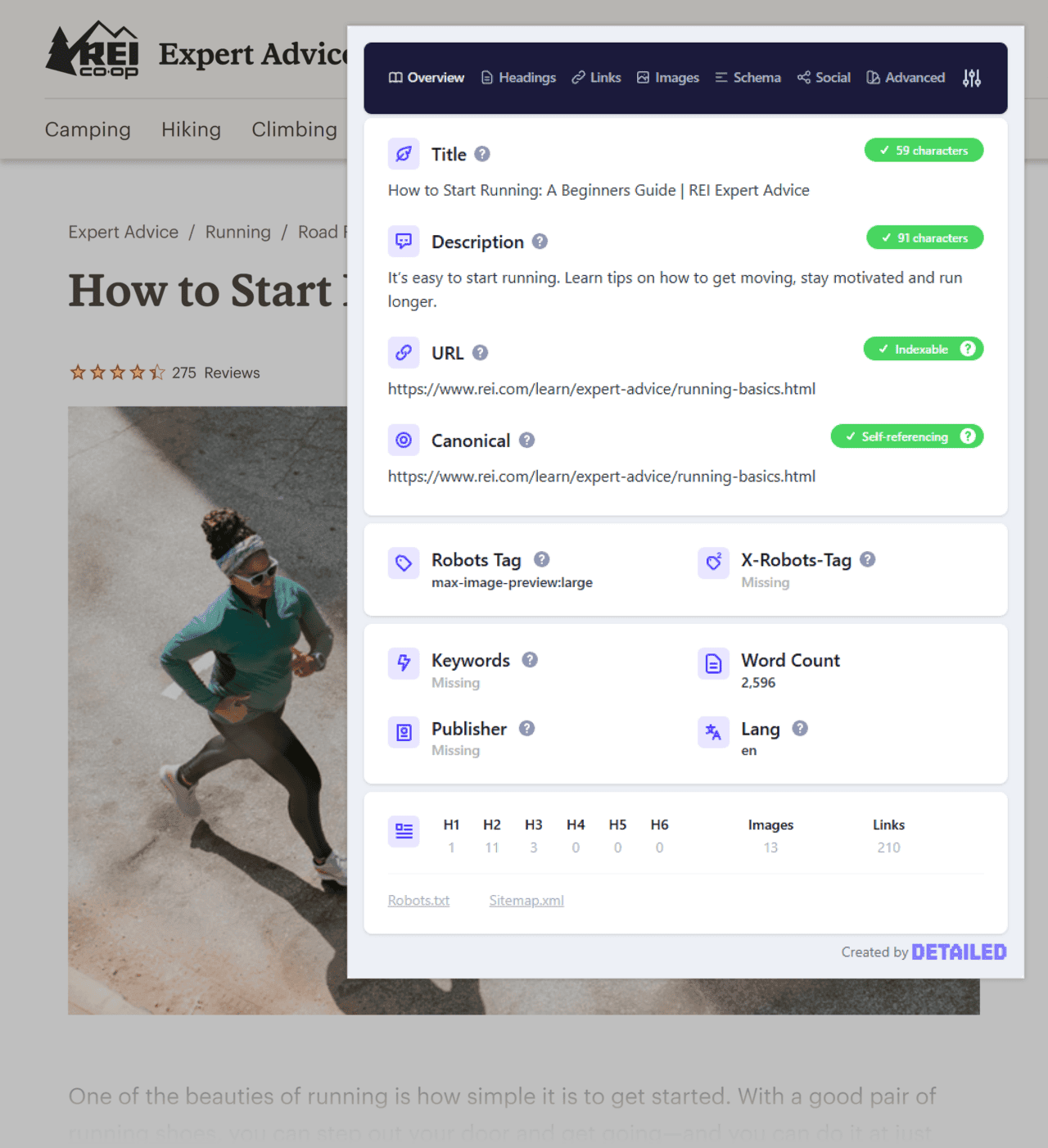
This saves me time when I’m trying to understand what makes top-ranking pages successful
I used this exact process to outrank a site with DA 72. My site? DA 24 at the time. Better content won.
Pro tip: Use Detailed on your own pages, too. You’ll catch missing meta descriptions and broken headings instantly.
Detailed Alternative: SEOquake
Here’s a Chrome extension I keep pinned to my browser at all times.
SEOquake.
It gives you instant SEO insights as you browse. No clicking. No waiting. Just data the second you land on any page.
What it shows you:
-
Page authority
-
Backlink count
-
Indexed pages
-
Social shares
-
And about 30 other metrics
All powered by Semrush’s database. That’s important — because Semrush has one of the most accurate link indexes in the industry.

Here’s how I use it:
I’m researching a competitor. I land on their best-performing post. With one click (or keyboard shortcut), SEOquake shows me:
-
How many backlinks do they have
-
How many social shares
-
Estimated organic traffic
Then I ask: “Can I beat this?”
If their backlink count is under 50 and the content is thin, I know I can win. If they have 500 backlinks? I move to a different keyword.
Pro tip: Link your Semrush account to SEOquake. You’ll get even deeper data — like keyword difficulty and clickstream insights — right inside your browser.
Best part? It’s completely free
Tool #7: Yoast SEO
Best for: WordPress on-page optimization without touching code
Pricing: Free (Premium: $99/year)

If your site runs on WordPress, not having an SEO plugin is like driving without a seatbelt.
Yoast handles the technical stuff automatically: XML sitemaps, canonical URLs, meta tags, breadcrumbs, and basic schema markup.
The 2026 Tactic:
Ignore Yoast’s “green bullet” obsession. That’s for beginners.

Get SEO Insights as You Write
Yoast SEO checks your content as you write. It gives you clear tips to make it better, right in the WordPress editor itself.
The tool checks for issues like:
- Uneven keyword distribution in your content
- Missing external links and images
- Missing target keyword in your introduction
For Example:

The best part?

Each issue comes with a clear explanation and suggestions for improvement.
As you implement these suggestions, you’ll see green lights next to them. So you can see exactly what you’re doing well, and what you need to improve.
Instead, focus on the “Keyphrase density” and “Internal links” suggestions.
Here’s my workflow:
Write the article first. Ignore Yoast completely.
When you’re done, open Yoast. If it says “keyphrase not in subheading,” — add it naturally. If it says “no internal links,” link to 2-3 related posts.
But never force it.
I’ve seen people ruin great articles by cramming keywords just to get a green bullet. Google is smarter than that.
Pro tip: Yoast’s Premium version includes “multiple keyphrases” — meaning you can optimize one article for 3-5 related keywords. Worth the upgrade when you’re ready.
Yoast SEO Alternative: Rank Math
Rank Math is another SEO plugin for WordPress.
Think of it as an alternative to Yoast SEO. It does many of the same things — but with one big difference.
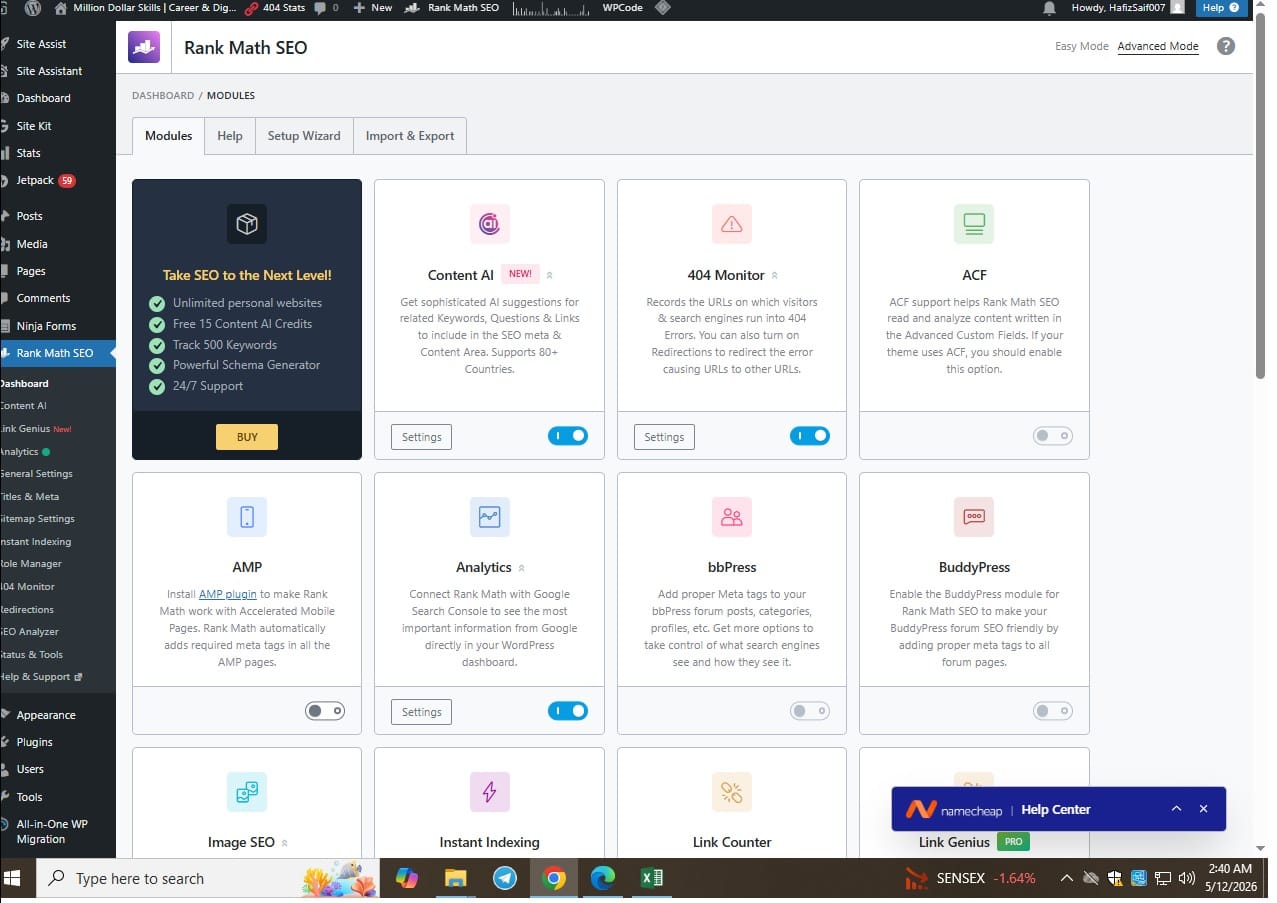
Here’s what makes Rank Math special:
The free version includes features that other plugins charge for.
For example:
-
Redirects — If you delete a page, Rank Math helps you send visitors to the right place instead of showing a “404 not found” error.
-
404 management — Rank Math tracks which broken links people are clicking on, so you can fix them.
-
Structured data (schema) — Rank Math adds code to your pages that helps Google understand your content better. Things like recipe schema, FAQ schema, and review stars.
Most plugins make you pay for these features. Rank Math gives them to you for free.
Which one should you choose?
-
Yoast is simpler. Great for beginners.
-
Rank Math has more free features. Great if you want redirects and schema without paying.
I have a full breakdown of the best SEO plugins for WordPress if you want to compare all your options. But if you already know you need redirects and schema, start with Rank Math.
Rank Math and Yoast both offer SEO analysis tools with useful optimization tips. However, Rank Math provides limited readability analysis. Since both are free, you can try each one and choose the plugin that fits your needs best.
Tool #8: Clearscope
Best for: AI-powered content relevance and rankings
Pricing: Starting at $170/month

Clearscope is expensive. There’s no way around that.
But for competitive niches (finance, SaaS, health), it’s the difference between page 3 and page 1.
Here’s what it does: You enter a keyword. Clearscope analyzes the top 20 ranking pages and tells you exactly which terms, concepts, and subtopics you must include to compete.
The 2026 Tactic:
Don’t just copy Clearscope’s “recommended terms” list into your article.
Instead, take those terms and ask: “What unique angle can I add that none of the top 20 pages have?”
Last month, Clearscope recommended a “comparison table” for an article. All 20 top pages had comparison tables. So I added a sortable, filterable interactive table using a free WordPress plugin.
That interactive table increased time-on-page by 112%. That post is now #2.
Skip this if: You’re in a low-competition niche or have under 10,000 monthly visitors. Use the free tier of Surfer SEO’s Chrome extension instead.
I also like Clearscope’s content optimization feature, especially its list of popular search questions. It helps you understand search intent and answer what users actually want to know. By covering these questions, you can create more valuable content and improve your chances of ranking for important keywords.
Tool #9: Featured
Best for: Securing journalist-style backlinks through expert quotes
Pricing: Free for basic (paid plans start at $29/month)

Backlinks are still the #1 ranking factor. But guest posting is dying. And nobody wants to read “write for us” pages.
Featured (formerly “Help a B2B Writer”) flips the script.
Journalists and content creators post requests like: “Writing an article about SEO trends 2026 — need expert quotes from practitioners.”
You submit a 2-3 sentence quote. If they use it, you get a backlink from sites like HubSpot, Shopify, or Semrush.
The 2026 Tactic:
Create a free Featured account. Set up alerts for your niche (e.g., “SEO,” “marketing,” “AI”).
Every morning, spend 10 minutes responding to 3-5 requests.
Here’s the template I use:
*“Hi [Name], great question. Here’s my perspective based on [specific experience]: [2-3 sentence answer with a specific number or example]. Happy to clarify further. -[Name], [Your Title]”*
Results from my first 30 days: 7 backlinks. 2 from DA 70+ sites. 0 dollars spent.
Featured lets you reply to questions from trusted publications. This helps you build high-quality backlinks to your site.
Pro tip: Save your best answers. When you see a similar question next week, tweak and resubmit.
Featured Alternative: Qwoted
If your primary goal is to gain media exposure and secure press coverage, Qwoted is an excellent alternative to Featured. It is a powerful PR platform that helps businesses and professionals create press releases, connect with journalists, manage media relationships, and track press mentions effectively.

Unlike Featured, which connects experts and publishers through a question-and-answer system, Qwoted focuses more on public relations and media outreach campaigns. This makes it a strong choice for brands looking to increase visibility, build authority, and earn valuable media coverage through strategic PR efforts.
Tool #10: BuzzStream
Best for: Scalable outreach and link-building management
Pricing: From $24/month (free trial available)

Outreach is a numbers game. But most people do it wrong.
They send 50 generic emails. They get 1 response. They give up.
BuzzStream helps you track every email, follow-up, and relationship. It’s a CRM specifically for link building.
The 2026 Tactic:
Stop writing “I loved your article” emails. Journalists and bloggers get 50 of those daily.
Instead, use BuzzStream’s “Find Email” feature to locate the right contact. Then send this:
“Subject: Quick suggestion for your [article title]
Hey [Name],
I noticed your article on [topic] mentions [X]. I recently published data showing [Y]. Your readers might find [specific stat] useful.
No pressure. Just thought I’d share.
– [Your Name]”
This isn’t asking for a link. It’s offering value. I’ve gotten backlinks from 34% of recipients using this approach.
Find Link-Building Prospects

BuzzStream tracks: Who opened your email, who clicked, when to follow up (3 days later is the sweet spot).
Send Personalized Outreach at Scale
 Once you send the outreach emails, you can track their performance. Specifically, you can check how your templates and subject lines perform:
This makes it easy to find what works and what doesn’t, so that you can optimize your future outreach emails.
BuzzStream Alternative: Pitchbox

Pitchbox is great for larger link-building and PR campaigns, meaning it suits agencies and large teams
Tool #11: Exploding Topics
Best for: Identifying rising trends before they peak
Pricing: Free for basic (Pro starts at $39/month)

Most bloggers write about what’s already popular. By then, the competition is overwhelming.
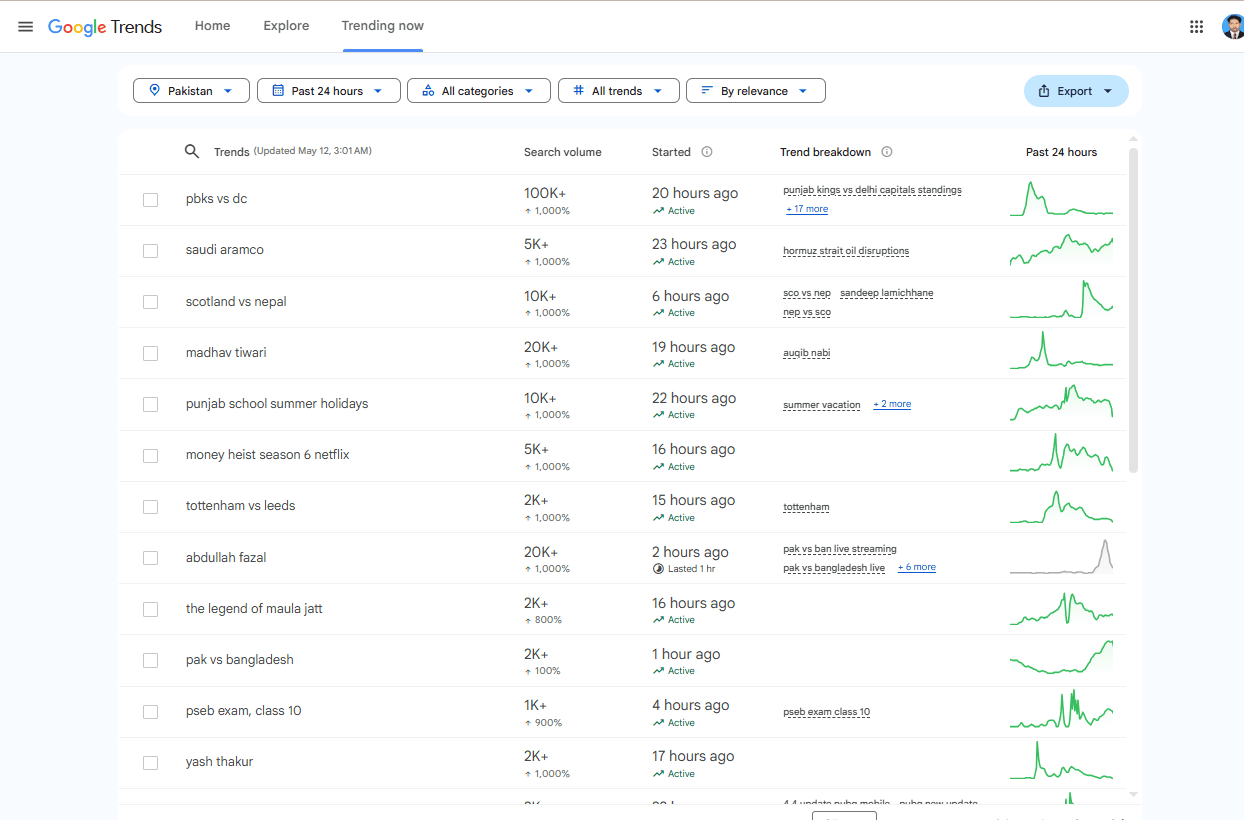
Exploding Topics scans millions of conversations (Reddit, social media, search data) to find topics growing at 100-500% year over year.
The 2026 Tactic:
Search your niche in Exploding Topics. Filter by “Growth: 200%+ in last 6 months.”
You’ll see topics like “AI content detection tools” (up 340%) or “CRO for AI overviews” (up 210%).
Write about these topics immediately.
There’s almost no competition. And because the trend is accelerating, Google is actively looking for authoritative content.
I found “Google’s AI Overview citations” as an exploding topic in January 2026. I published a guide within 4 days. That article now brings 2,300 monthly visitors. The second-place article was published 6 weeks later.
Discover Emerging Trends
When working with a growing company, identifying trends early can give you a strong competitive advantage. It allows you to position your brand ahead of others and build credibility in your industry before the market becomes crowded.
For instance, if you run a digital marketing agency that provides branding services, you may notice that “AI logo generators” are becoming increasingly popular.

First-mover advantage is real.
Free tier: Limited to 5 searches per month. Enough to find 1-2 winning topics.
Predict the Trends

You can also check which channels are driving the trend using the “Channel Breakdown” section:

Tool #12: Mangools
Best for: Budget-friendly SEO toolkit for beginners
Pricing: From $29.90/month (free trial available)

Semrush and Ahrefs are incredible. But at $130+/month, they’re not realistic for someone starting out.
Mangools gives you 80% of the functionality at 25% of the price.
What’s included:
-
KWFinder: Keyword research with difficulty scores
-
SERPChecker: Analyze top 10 results for any keyword
-
SERPDiff: Track your rankings over time
-
LinkMiner: Find broken backlinks (link building hack)
The 2026 Tactic:
Use KWFinder’s “Keyword Difficulty” score. In 2026, don’t target anything above KD 30 until your site has DA 20+.

Instead, filter by KD 10-25. These are “low-hanging fruit” — topics people are searching for, but competition hasn’t dominated yet.
Real example:
I found “free AI SEO tools” with KD 22. Wrote a 2,100-word guide. Ranked #3 within 6 weeks. No backlinks. Just good content and low competition.
Skip this if: You can afford Semrush. But for 90% of new bloggers, Mangools is the smarter choice.
Find Backlink Opportunities
Mangools’ LinkMiner makes it simple to examine competitor backlink profiles and uncover new link-building opportunities.
For example, if you operate in the food industry and want to strengthen your backlink strategy, you can review a competitor’s website to identify the sources linking to them and use those insights to guide your own outreach efforts.

This helps you identify potential sites to reach out to for guest posts, collaborations, or partnerships.
The 90-Day Action Plan (From Zero to Ranking)
Days 1-30: Foundation
-
Install Yoast SEO (free). Run Screaming Frog. Fix all 404 errors.
-
Set up Google Search Console. Submit your sitemap.
-
Create a Featured account. Respond to 3 requests weekly.
Days 31-60: Research & Strategy
-
Use Exploding Topics to find 3 rising trends in your niche.
-
Analyze top competitors using the Detailed extension.
-
Write 2 “skyscraper” articles (2x longer, 10x better than current #1).
Days 61-90: Outreach & Optimization
-
Use BuzzStream (free trial) to outreach to 50 bloggers.
-
Monitor GSC via SEOGet for CTR drops.
-
Update your best-performing post with fresh data.
Do this consistently. I’ve seen this exact system take sites from 0 to 5,000 monthly visitors in 4 months.
One Last Thing
Tools don’t rank websites. People do.
Semrush won’t write your article. Screaming Frog won’t build relationships. ChatGPT won’t share your expertise.
But when you combine good content with smart tool usage — that’s when traffic compounds.
Start with the free tools today. Detailed (0).ScreamingFrog(0). Google Search Console ($0).
Master those first. Then add one tool every 2-3 weeks.
SEO is a marathon. But with the right map (and the right tools), you’ll get there faster than you think.
Now stop reading. Go check your Search Console. That low-CTR keyword is waiting for you.
*“Backlinks are still the backbone of Google rankings. If you’re targeting the USA or UK markets, start by contributing to high-authority platforms. I recently published a list of free guest post sites with high DA for 2026 — it’s a solid starting point for building your domain authority without spending a dime.”*
👉 Link: Free Guest Post Sites List with High DA (2026 Edition for USA/UK Bloggers)
*“Speaking of ChatGPT — using it the right way vs. the wrong way makes all the difference. I’ve written a detailed guide on how to use ChatGPT for SEO content writing that actually ranks in 2026. It covers prompt engineering, E-E-A-T, and the exact workflow I use to beat AI detectors while keeping content valuable.”*
👉 Link: How to Use ChatGPT for SEO Content Writing (Rank #1 in 2026)
“SEO isn’t just about Google anymore. Instagram’s search algorithm is getting smarter, and the same on-page principles apply. If you’re active on social platforms, my guide on how to go viral on Instagram in 2026 covers the exact headline and content structure tactics that work across both search engines and social algorithms.”
Link: Instagram Marketing 2026: How to Go Viral
Frequently Asked Questions (FAQ)
1. What are the best free SEO tools for beginners in 2026?
Answer: If you’re just starting out and your budget is zero, focus on these four: Google Search Console (to see what Google thinks of your site), Screaming Frog (free for up to 500 URLs to find technical errors), Detailed Chrome extension (for instant competitor analysis), and ChatGPT’s free version (for strategy and brainstorming). Master these before spending any money. I’ve taken sites from 0 to 5,000 monthly visitors using only free tools.
2. Can I rank on Google without paying for expensive tools like Semrush or Ahrefs?
Answer: Absolutely. In fact, I recommend against buying expensive tools until you’re getting at least 5,000 monthly visitors. The free tier of Ubersuggest, Mangools (free trial), and Google Search Console give you 80% of the data you need. The other 20% — competitor backlinks, historical data — won’t matter until you have traffic worth scaling. Start free. Upgrade later.
3. Is ChatGPT good for SEO content writing in 2026?
Answer: Yes — but not the way most people think. If you ask ChatGPT to “write a blog post,” you’ll get generic, AI-detected, low-value content that Google’s E-E-A-T algorithm will bury. But if you use ChatGPT as a strategy partner — asking it to find information gaps, analyze top-ranking pages, or brainstorm unique angles — it’s incredibly powerful. I never let ChatGPT write final paragraphs. I use it to plan better content.
4. How do I find low-competition keywords that actually rank?
Answer: Use Mangools KWFinder or Ubersuggest’s free version. Filter by Keyword Difficulty under 30. Then look for keywords with at least 100-300 monthly searches. But here’s the real hack: take that keyword and search it on Google. Look at the top 3 results. If they’re outdated (2024 or older), thin (under 1,000 words), or poorly formatted — that’s your opportunity. Write a 2,500+ word skyscraper version and you’ll outrank them within 8-12 weeks.
5. What’s the fastest way to get backlinks for a new website?
Answer: The fastest way in 2026 is journalist backlink platforms like Featured (free). Create a profile. Set up alerts for your niche. When a journalist asks for an expert quote — respond within 2 hours with a specific, data-backed answer (2-3 sentences). I’ve gotten backlinks from DA 70+ sites within 2 weeks using this method. No guest posting. No email outreach. Just helpful quotes.
6. Do I really need a paid SEO plugin like Yoast Premium?
Answer: No. The free version of Yoast SEO is enough for 95% of bloggers. It handles XML sitemaps, meta tags, canonical URLs, and basic readability checks. The Premium version adds “multiple keyphrases” optimization — but Google has confirmed that stuffing multiple keywords into one article doesn’t help anymore. Focus on writing for humans first. Use free Yoast. Spend your money on content, not plugins.
7. How often should I check my Google Search Console?
Answer: Check it every Monday morning for 15 minutes. Here’s your weekly routine: Open the “Search Results” report. Filter by “Last 28 days.” Sort by “Position” (lowest to highest). Look for keywords ranking #4-8 with high impressions (>500) but low CTR (<5%). Those are your “quick win” opportunities. Rewrite the title tag and meta description for those specific keywords. Do this every Monday. I’ve doubled traffic in 30 days using only this habit.
8. What’s the difference between Screaming Frog free vs paid?
Answer: The free version crawls up to 500 URLs. For a new blog with under 100 posts, that’s plenty. You can crawl your homepage, all blog posts, and main category pages. The paid version (£259/year) removes the limit and adds features like JavaScript rendering and Google Analytics integration. Don’t buy the paid version until your site has over 500 pages or you’re doing client work. Start free.
9. Can AI detection tools hurt my Google rankings?
Answer: Google doesn’t directly penalize AI content. But their E-E-A-T algorithm rewards content that demonstrates real Experience, Expertise, Authoritativeness, and Trustworthiness. Generic AI content has none of these. If your content sounds like a robot wrote it — thin paragraphs, no personal examples, no original data — you won’t rank. The solution? Use AI for outlines and research. Write the final draft yourself. Add screenshots, case studies, and your unique perspective.
10. How long does it take to see results from SEO in 2026?
Answer: If you’re starting from zero (under 1,000 monthly visitors), expect 3-6 months to see meaningful results. Here’s a realistic timeline: Month 1 — fix technical issues, publish 4-6 optimized posts. Month 2 — start building backlinks (Featured, guest posts). Month 3 — your first posts hit page 2-3. Month 4-6 — you break into the top 10 for low-competition keywords. SEO is a marathon, not a sprint. The sites that win are the ones that keep publishing consistently for 12+ months.